

design-research-experiments#
The study-design and orchestration layer for reproducible design research.
What This Library Does#
design-research-experiments defines study structure: hypotheses, factors,
blocking, admissible conditions, replications, and artifact flows. It
coordinates how agents, problems, and downstream analysis are connected in a
controlled experimental pipeline.
This library is the methodological control layer of the CMU Design Research Collective design-research ecosystem. It is not just another execution utility. It encodes experimental method in software and is where design choices about rigor, admissibility, and reproducibility are made.






Quality Signals#
Coveragereports total line coverage for the default deterministic test suite; CI requires at least 95%.Examples Passingreports checked-in example scripts that execute successfully in the examples workflow.API in Examplesreports curated top-level__all__exports referenced by runnable examples.N/Nmeans every supported top-level export appears in at least one example, and CI requires 100%.
Run make coverage, make examples-test, and make examples-coverage
to reproduce these checks locally.
Highlights#
Study schemas for hypotheses, factors, blocking, admissible conditions, and replications
Artifact contracts that connect runs, events, and evaluation outputs
Reproducible condition materialization and execution helpers
Runnable examples and recipes for study-definition workflows
Documented composition seams for user code:
design_research_problems.integration, the stabledesign_research_agents.studyfacade, and the top-leveldesign_research_analysisartifact API
The internal package adapters consume design_research_problems.integration
and design_research_agents.integration. The latter is a compatibility seam,
not the recommended authoring API; new user code should use
design_research_agents.study.
Typical Workflow#
Define hypotheses, factors, blocking, and admissible conditions.
Materialize concrete study conditions and replication plans.
Execute runs across agents and problems while preserving artifact contracts.
Export standardized artifacts for downstream analysis and reporting.
Reuse examples and recipes to benchmark or extend the protocol.
Note
Start with Quickstart to define a first study, materialize a concrete condition set, and get into a reproducible local loop before branching into examples, recipes, and reference material. If you are integrating downstream tooling, keep Artifact Contract open beside the quickstart so the public export guarantees stay explicit.
Guides#
Learn the study-modeling concepts, setup flow, and orchestration patterns that shape a stable experimental pipeline.
Examples#
Browse runnable examples that show the public API in action across the major study-definition and execution surfaces.
Reference#
Look up the stable import surface, CLI behavior, reference pages, and optional development extras.
Architecture: Two Complementary Views#
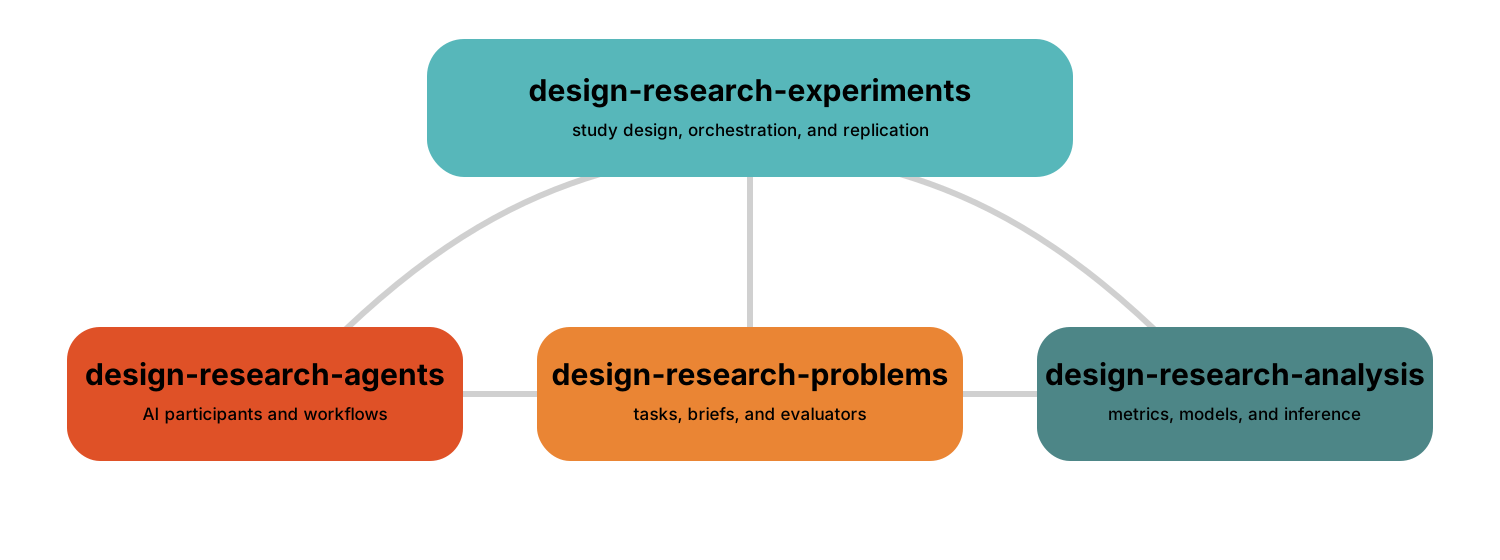
Control topology: Problems and Agents are peer study inputs. Experiments owns study design and coordinates their execution, then defines the artifact handoff to Analysis.
Runtime and data flow: Problems + Agents → Experiments artifact set → Analysis → evidence that can refine the next study protocol.
These are two views of the same package family, not an installation order. The umbrella routes imports and pins a tested combination; implementation stays with the package that owns each behavior. See the umbrella compatibility and package status for the tested family combination.
Ecosystem Packages#
Problems — tasks, prompts, grammars, benchmarks, and evaluators: documentation
Agents — AI participants, workflows, tools, and traceable reasoning: documentation
Experiments — hypotheses, factors, conditions, replications, execution, and artifact export: Guides
Analysis — validation, transformation, statistics, and visualization of study artifacts: documentation
Umbrella — routed imports, learning paths, and tested compatibility: documentation