

design-research-analysis#
The analysis layer for reproducible design-research event data.
What This Library Does#
design-research-analysis is the analysis and interpretation layer in the
CMU Design Research Collective design-research ecosystem. It supports sequence
analysis, language analysis, embedding maps, and statistical modeling over
unified event tables and canonical experiment artifacts. It is built for
recurring research workflows where validation, provenance, and repeatability
are first-order concerns.
Unified-table validation and column derivation are core features, not pre-processing footnotes. They make downstream analyses composable, reproducible, and easier to compare across studies.






Quality Signals#
Coveragereports total line coverage for the default deterministic test suite; CI requires at least 95%.Examples Passingreports checked-in example scripts that execute successfully in the examples workflow.API in Examplesreports curated top-level__all__exports referenced by runnable examples.N/Nmeans every supported top-level export appears in at least one example, and CI requires 100%.
Run make coverage, make examples-test, and make examples-coverage
to reproduce these checks locally.
Highlights#
Unified-table coercion, validation, and mapper-driven derived columns
Dataset profiling, schema checks, and codebook generation
Sequence analysis for Markov chains and Hidden Markov Models
Language analysis for semantic convergence, topic discovery, and sentiment
Embedding maps and clustering for embedding-space inspection
Statistical workflows for comparisons, regression, mixed effects, and power
Runtime provenance capture for reproducible study artifacts
Top-level artifact handoff helpers for experiment exports
Portable analysis results and evidence-linked paper contributions
Deterministic, integrity-checked paper-draft research bundles
Typical Workflow#
Start from a unified event table or top-level artifact helpers over an exported
design-research-experimentsstudy-output directory.Validate and, when needed, derive missing analysis columns.
Run sequence, language, embedding-map, and/or statistical workflows.
Persist JSON summaries, CSV exports, and provenance manifests.
Rejoin findings to
runs.csvandevaluations.csvfor study context.
Note
Start with Quickstart for the shortest runnable path, or
Experiments-To-Analysis Handoff if you already have events.csv from
design-research-experiments.
Guides#
Learn the table model, setup flow, and repeatable analysis patterns that shape a stable downstream research pipeline.
Examples#
Browse runnable examples covering the major analysis surfaces.
Reference#
Look up the stable import surface, CLI behavior, and dependency guidance for repeatable analysis environments.
Architecture: Two Complementary Views#
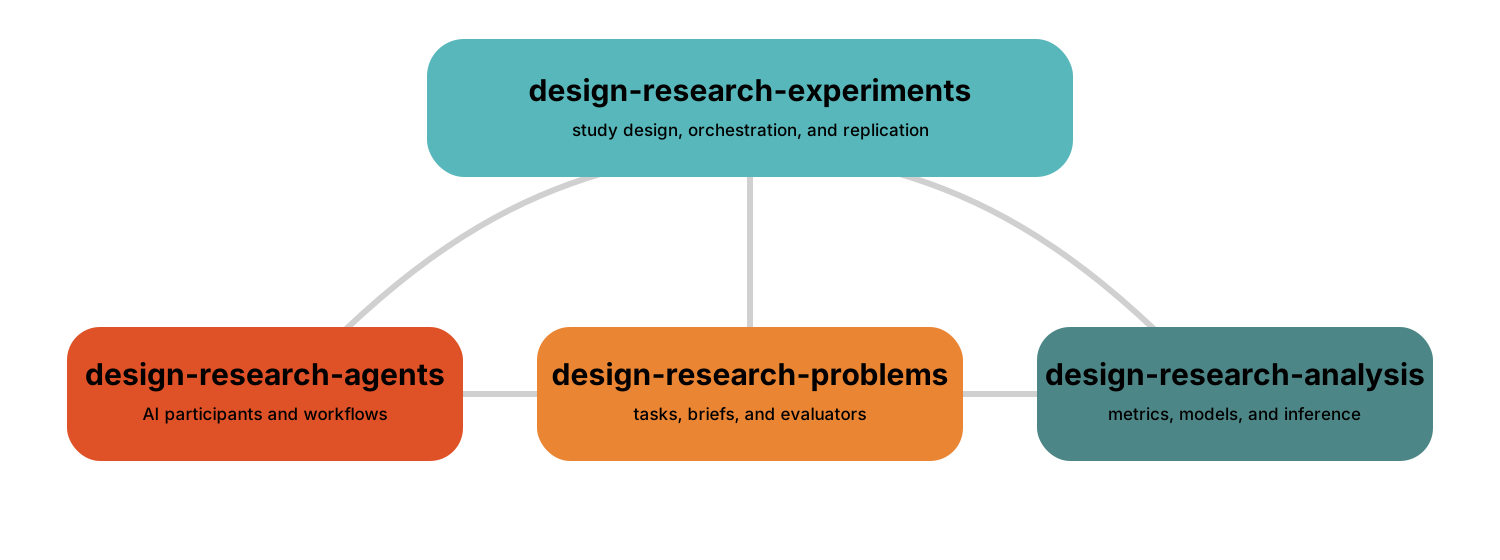
Control topology: Problems and Agents are peer study inputs. Experiments owns study design and coordinates their execution, then defines the artifact handoff to Analysis.
Runtime and data flow: Problems + Agents → Experiments artifact set → Analysis → evidence that can refine the next study protocol.
These are two views of the same package family, not an installation order. The umbrella routes imports and pins a tested combination; implementation stays with the package that owns each behavior. See the umbrella compatibility and package status for the tested family combination.
Ecosystem Packages#
Problems — tasks, prompts, grammars, benchmarks, and evaluators: documentation
Agents — AI participants, workflows, tools, and traceable reasoning: documentation
Experiments — hypotheses, factors, conditions, replications, execution, and artifact export: documentation
Analysis — validation, transformation, statistics, and visualization of study artifacts: Guides
Umbrella — routed imports, learning paths, and tested compatibility: documentation